Last Updated on February 19, 2026 by Shubam

Table of Contents
Every time you add a link that opens in a new tab, you’re making a choice about security and privacy, even if you don’t realize it.
Here’s what happens when you skip the right HTML attributes: the site you’re linking to can actually control your original page through JavaScript.
Worse, your analytics tracking breaks, and you lose valuable referral data without ever knowing why.
The fix? Two simple HTML attributes called rel=”noopener” and rel=”noreferrer”.
This guide walks you through what they do, when to use them on external links, and how they affect your SEO and analytics.
What are rel=”noopener” and rel=”noreferrer”?
rel=”noopener” and rel=”noreferrer” are two HTML attributes you add to links to protect security and privacy when those links open in new tabs.
Think of rel=”noopener” as a security lock. It stops the new page from controlling or changing your original page. rel=”noopener” specifically prevents browsing context access by the new tab, blocking new browsing context access to the original page and mitigating risks like tabnabbing.
rel=”noreferrer” instructs the browser to omit the Referer header when navigating, which prevents the destination from seeing the full URL that sent the traffic.
Without rel=”noopener”, the new page has partial access to the original page via the window.opener object, which can be exploited for malicious purposes such as phishing attacks or manipulating the original site.
You add both attributes to your anchor tags using the rel parameter. When you write rel=”noopener noreferrer” on a link with target=”_blank”, you’re building a protective barrier between your site and the external destination.
Modern browsers have gotten smarter about this. Since 2021, Chrome, Edge, and other Chromium-based browsers automatically apply rel=”noopener” to all target=”_blank” links.
What is rel=”noopener”?
rel=”noopener” is the HTML code that stops a newly opened tab from accessing something called the window.opener property.
In plain English, this property normally lets JavaScript in the new tab reach back and control the original page that opened it. The target attribute, specifically target=’_blank’, is what causes a link to open in a new tab, but if used without rel=’noopener’, it can create a security vulnerability by allowing the new page to control the original page.
By setting window.opener to null, rel=”noopener” blocks reverse tabnapping, where a malicious site redirects your original page to a phishing site.
What is rel=”noreferrer”?
The rel=”noreferrer” attribute is an HTML tool designed to protect user privacy when linking to external sites.
When you add rel=”noreferrer” to a link, you’re telling the browser not to send any referrer information to the destination website. This means the external website won’t know which page your visitor came from your URL is kept completely private.
This attribute is especially useful if you want to prevent competitors, affiliate partners, or any external website from seeing your traffic sources. It’s also a smart move when linking to a potentially harmful website or when you want to keep your site’s structure confidential.
However, there’s a trade-off: using rel=”noreferrer” will cause your outbound traffic to show up as “direct” in the destination’s analytics platforms, such as Google Analytics. This can affect affiliate marketers or partnership programs that rely on referral tracking, as the referring page won’t be credited for the visit.
Why rel=”noopener” and rel=”noreferrer” Matter?
rel=”noopener” prevents reverse tabnapping, a security exploit where the site you linked to can hijack your original tab.
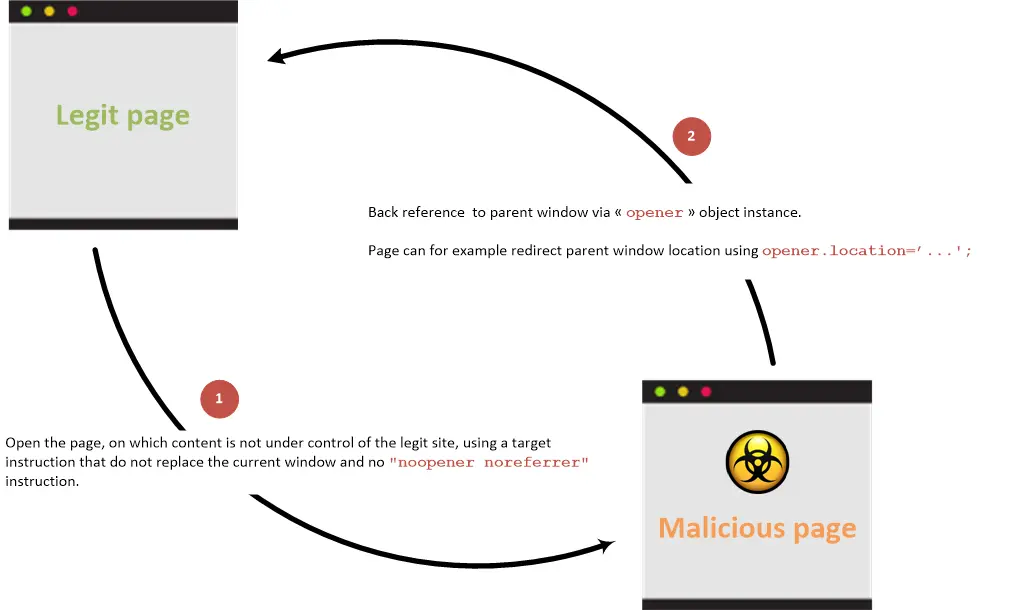
👉🏻 Here’s how it works:
Someone clicks your link, browses the external site in a new tab, and while they’re distracted, that site quietly redirects your original tab to a fake login page. When they come back, they think they’re still on your site and enter their password, but they’re actually on a phishing page. Failing to use rel=’noopener’ creates a security vulnerability for the site owner and their users, as it exposes them to these types of attacks.
rel=”noreferrer” hides the HTTP Referer header, the piece of data that tells the destination site which URL sent the traffic. This protects user privacy by stopping sites from tracking where people came from, but it also breaks referral tracking in analytics.
When you use rel=”noreferrer”, your traffic shows up as “direct” in the other site’s Google Analytics instead of showing your domain as the referral source.
Throughout 2024, security researchers continued documenting XSS vulnerabilities and cross-site scripting exploits that go after poorly configured external links.
Proper link implementation is just one aspect of a comprehensive SEO strategy. Understanding what is link building helps you see how security attributes fit into your broader backlinking efforts.
If you run a site with user-generated content (forums, blog comments, or link directories), rel=”noopener” is essential. You can’t vet every URL users submit, so automatic rel=”noopener” protection stops bad actors from hijacking your site through contributed links.
Link security is a key responsibility for any site owner, especially when dealing with untrusted or user-submitted links. The use of noopener is especially important when linking to untrusted sites to protect against potential phishing attacks.
How to Add rel=”noopener” rel=”noreferrer” to Links?
Add rel=”noopener noreferrer” to any anchor tag that includes target=”_blank” to protect against security exploits and hide referrer data. When editing your HTML, be sure to inspect your page’s code to ensure the rel attributes are correctly implemented.
Skip these attributes, and external sites can control your original tab through JavaScript, opening the door to phishing and session hijacking.
✅ Quick Fix for All External Links
Add this to every external link that opens in a new tab: rel=”noopener noreferrer”
When you open external links in a new tab, adding these attributes protects user privacy and security. That’s it. Two attributes = full protection.
How to add rel=”noopener” to internal links?
While rel=”noopener” is essential for external links that open in a new tab, it’s rarely needed for internal links, those that point to other pages on your own website. Adding rel=”noopener” to internal links won’t harm your site, but it can interfere with analytics tracking and user experience.
If you do decide to use target=”_blank” for internal links (for example, to keep users on a landing page while they explore another section), you can technically add rel=”noopener” for an extra layer of security. This will prevent the new page from accessing the previous page’s code via the opener property, even within your own domain.
What is target _blank rel=”noopener” rel=”noreferrer”?
target=”_blank” makes links open in new tabs. rel=”noopener noreferrer” adds security and privacy controls to that behavior. The rel=”noreferrer” HTML tag is used to protect privacy by preventing the browser from sending the referrer information to the target resource when opening a link in a new tab.
Here’s what the code looks like:
✅ Correct implementation:
<a href="https://example.com" target="_blank" rel="noopener noreferrer">
  External Site
</a>
❌ Incorrect implementation (vulnerable):
<a href="https://example.com" target="_blank">
  External Site
</a>
See the difference? The second example opens in a new tab but leaves the door open. Modern browsers automatically apply rel=”noopener” to target=”_blank” as of 2021 for Chromium browsers, but adding it explicitly ensures protection across all browsers and adds the rel=”noreferrer” functionality.
What you need:
- 📝 HTML access to your anchor tags
- 🔗 External links with target=”_blank”
- ✏️ A text editor or CMS link insertion tool
Understanding how to implement these attributes is an important part of web development best practices.
How to add it:
- Find all anchor tags with target=”_blank” in your HTML
- Add rel=”noopener noreferrer” to the opening anchor tag
- Check that the attribute appears before the closing bracket
- Test the link by opening it in a new tab and typing window.opener into the browser console (it should return null)
- If you’re using WordPress 4.7.4 or later, WordPress automatically adds rel=”noopener noreferrer” to external links that open in new tabs for security reasons. This is standard behavior for any WordPress website and helps protect against certain attacks.
You can use rel=”noopener” by itself if you want to keep referral tracking. Or use rel=”noreferrer” alone if privacy is your main concern. But using both together is the standard approach for external links.
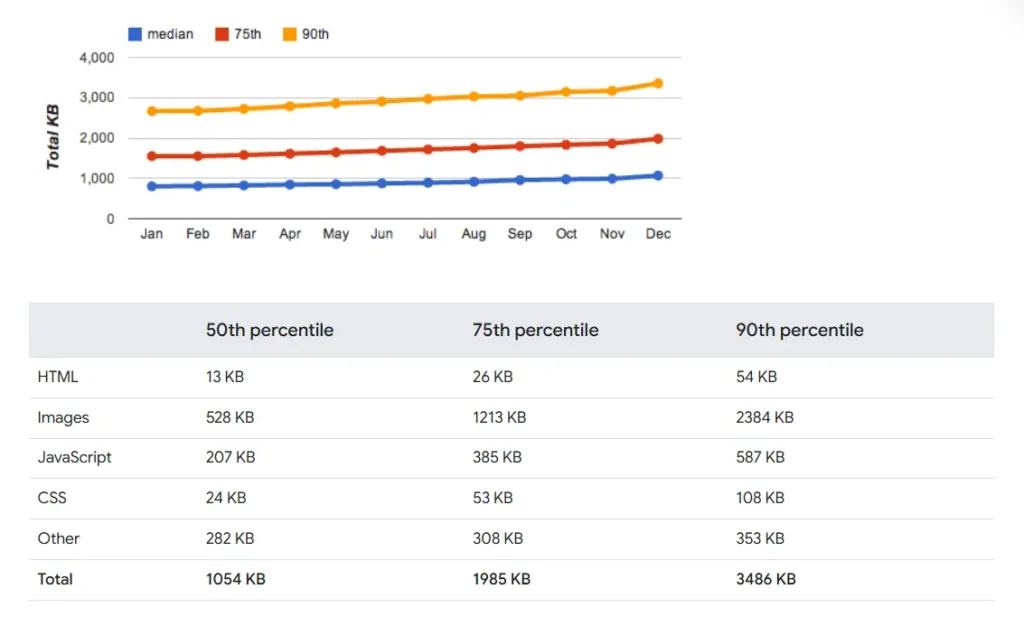
Performance note: Adding rel=”noopener” and rel=”noreferrer” has zero impact on page load speed or Core Web Vitals scores. These attributes are processed at render time, not during page load.
Does rel=”noopener” mean rel=”nofollow”?
No. rel=”noopener” controls browser security and has zero impact on how search engines crawl or rank your pages. rel=”nofollow” tells Google and other search engines to ignore a link when calculating rankings, which stops the transfer of PageRank or link authority.
Google introduced two more SEO attributes in September 2019: rel=”sponsored” for paid links and ads, and rel=”ugc” for user-generated content like forum posts and comments.
| Attribute | Purpose | Effect on SEO | Blocks window.opener | Strips Referer Header |
| rel=”noopener” | Security | None | ✅ Yes | ❌ No |
| rel=”noreferrer” | Privacy | None | ✅ Yes (implied) | ✅ Yes |
| rel=”nofollow” | SEO directive | Blocks link equity | ❌ No | ❌ No |
| rel=”sponsored” | SEO directive | Marks paid links | ❌ No | ❌ No |
| rel=”ugc” | SEO directive | Marks user content | ❌ No | ❌ No |
There are also other attributes, such as rel=”sponsored” and rel=”ugc”, which serve specific purposes for paid and user-generated links, highlighting the importance of using the right attribute for different link types.
🔍 SEO Myth: Does rel=”noopener” hurt rankings?
Answer: No.
Google and other search engines completely ignore rel=”noopener” and rel=”noreferrer” when crawling your site. These attributes don’t affect:
- ✅ Your search rankings (they do not affect SEO and have no direct negative effect on search engine rankings)
- ✅ Link equity (PageRank) transfer (although these links may have less SEO value, they do not harm your site’s visibility)
- ✅ How Google indexes your pages
They’re security features, not SEO directives.
Additionally, rel=”noopener noreferrer” does not affect affiliate links—affiliate tracking mechanisms like cookies and conversion data will still work, so affiliate programs can track conversions as long as rel=”noreferrer” is not used.
Common Mistakes to Avoid When Using Noopener
Even experienced web developers and site owners can make mistakes when implementing the noopener tag. Here are some of the most common pitfalls to watch out for:
- Forgetting to add rel=”noopener” to target=”_blank” links: This leaves your site vulnerable to reverse tabnapping and other security risks, especially when linking to external sites.
- Using rel=”noopener” on links that don’t open in a new tab: The noopener attribute only has an effect when used with “` target=”_blank”. Adding it to links that open in the same tab does nothing.
- Omitting rel=”noopener” on user-generated content: If your site allows users to submit links (in comments, forums, or directories), always ensure these links include noopener to prevent malicious website exploits.
- Combining rel=”noopener” with rel=”noreferrer” on affiliate links: Most affiliate programs require referral data to track sales. Using both attributes can break tracking—use only noopener for affiliate links unless privacy is more important than tracking.
- Relying solely on browser defaults: While modern browsers like Google Chrome automatically add noopener to new tabs, not all browsers or older versions do. Always include it explicitly in your HTML code for full coverage.
- Adding rel=”noopener” to internal links unnecessarily: This can disrupt analytics and isn’t needed for links within your own website unless you have a specific security concern.
By avoiding these mistakes, you’ll keep your website security tight, your analytics accurate, and your user experience smooth.
Common scenarios:
- 📰 External editorial link: Use rel=”noopener noreferrer” only (passes SEO value, keeps security tight)
- ✍️ Blog post with external links: Use rel=”noopener noreferrer” on links in your blog post to help prevent vulnerabilities like reverse tabnapping, which can be exploited for phishing or malware attacks.
- 💰 Paid or sponsored link: Use rel=”sponsored noopener noreferrer” (marks it as paid, maintains security)
- 💬 User comment link: Use rel=”ugc noopener noreferrer” (marks it as user content, maintains security)
- ⚠️ Untrusted external link: Use rel=”nofollow noopener noreferrer” (blocks equity, maintains security)
When to Use rel=”noopener” rel=”noreferrer”?
Use rel=”noopener noreferrer” on all external links that open in new tabs, especially for user-generated content, affiliate links, and any destination where you can’t control what happens on the other site.
When a user clicks open external links in new tabs, rel=”noopener noreferrer” helps protect their privacy and security by preventing the new page from accessing the original page and by not passing referrer information.
✅ Add rel=”noopener” rel=”noreferrer” to:
- 🌐 External links with target=”_blank” that leave your domain
- 💬 User-generated content like forum posts, blog comments, and community submissions
- 🤝 Affiliate links and sponsored content that open in new tabs (using rel=”noopener” does not affect affiliate links’ tracking, but adding rel=”noreferrer” can interfere with referral data and affect affiliate links’ reporting)
- 📚 Resource lists, directory listings, and curated link collections
❌ Skip rel=”noopener” rel=”noreferrer” for:
- 🏠 Website owners should consider their analytics and referral tracking needs when deciding whether to use these attributes. For example, skip rel=”noopener noreferrer” on internal links between pages on your own domain, as it can mess up analytics tracking.
- 📄 Links that open in the same tab without target=”_blank”
- 🤝 Trusted partner sites where website owners need referral attribution for tracking
If your site has comment sections or forums, automatically apply rel=”ugc noopener noreferrer” to all user-submitted links.
💰 Special Case: Affiliate Links
For affiliate links, use rel=”noopener” WITHOUT rel=”noreferrer”: rel=”sponsored noopener”. If you’re actively building affiliate partnerships or exploring places to buy backlinks, maintaining proper tracking while securing your links is essential.
Why? Because rel=”noreferrer” blocks referral tracking, which means you won’t get credit for the sale. Additionally, rel=”noreferrer” can interfere with Google Analytics reporting for affiliate programs by hiding referral data, making it harder to track conversions and traffic sources accurately.
rel=”noopener” alone = security ✅ + tracking works ✅
How WordPress and Other Platforms Handle rel=”noopener” rel=”noreferrer”?
WordPress has automatically added rel=”noopener noreferrer” to target=”_blank” links since version 4.7.4 in May 2017, and most modern browsers now apply rel=”noopener” by default. Chrome 88 and other Chromium browsers started automatically protecting links in January 2021, following Firefox 79 in July 2020.
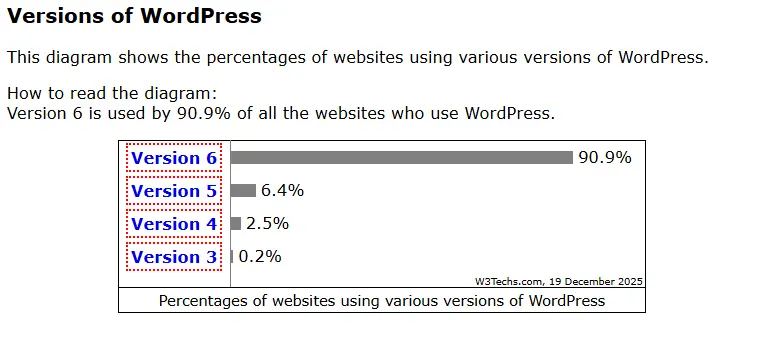
WordPress powers 43% of all websites globally as of 2025, meaning billions of links automatically include rel=”noopener noreferrer” protection.
Other major platforms handle this similarly:
- 🛒 Shopify: Automatically adds rel=”noopener noreferrer” to external links in product descriptions and blog posts, ensuring that links within a blog post are protected from vulnerabilities like reverse tabnapping
- 🎨 Wix: Applies rel=”noopener” to target=”_blank” links created through the visual editor
- 🖼️ Squarespace: Includes rel=”noopener” on external links by default in version 7.1 and later
- 👻 Ghost: Adds rel=”noopener noreferrer” automatically to markdown links with target=”_blank”
Is rel=”noopener” rel=”noreferrer” still needed?
Yes, you should still add it for cross-browser consistency and legacy support. Chrome 88 and later (January 2021), Firefox 79 and later (July 2020), and Safari 12.2 and later automatically apply rel=”noopener” to target=”_blank” links. But here’s the catch: browsers only apply automatic rel=”noopener”. They don’t add rel=”noreferrer”.
If you want to hide referrer data for privacy or competitive reasons, you need to explicitly include rel=”noreferrer” in the rel attribute. For sites that get traffic from older devices or corporate networks with outdated browsers, manual implementation is still critical.
Website owners should manually implement these attributes to ensure full coverage and maintain control over analytics, link management, and privacy.
Impact on SEO, Analytics, and Website Security
rel=”noopener” and rel=”noreferrer” don’t function as Google ranking signals and won’t affect SEO using rel=”noopener noreferrer” neither harms nor benefits your search engine rankings.
However, rel=”noreferrer” does impact analytics by stopping the destination site from seeing referrer data, which makes your traffic appear as “direct” instead of “referral” in their Google Analytics reporting.
Beyond link attributes, keeping an organized backlink profile allows you to track which external sites link to you and assess their quality for SEO and credibility.
Additionally, the use of rel=’noopener noreferrer’ can obscure referral information, which may affect relationship building with other site owners.
| Your Link Attributes | Destination Site Sees | Your Analytics Shows |
| None (bare link) | Full referrer URL | Outbound click (if tracked) |
| rel=”noopener” | Full referrer URL | Outbound click (if tracked) |
| rel=”noreferrer” | No referrer (Direct traffic) | Outbound click (if tracked) |
| rel=”noopener noreferrer” | No referrer (Direct traffic) | Outbound click (if tracked) |
If you run affiliate campaigns or partnership agreements where the destination site needs to know you sent them traffic, consider using rel=”noopener” by itself without rel=”noreferrer”. This keeps security tight while preserving referral tracking.
While rel=”noopener” and rel=”noreferrer” affect link behavior and security, SEO growth still depends heavily on creating and earning authority backlinks that signal trust to search engines.
Testing rel=”noopener” rel=”noreferrer”
Test your rel=”noopener” implementation by opening a link in a new tab and typing window.opener into the browser console. It should return null if rel=”noopener” is working.
🔬 Manual browser console test:
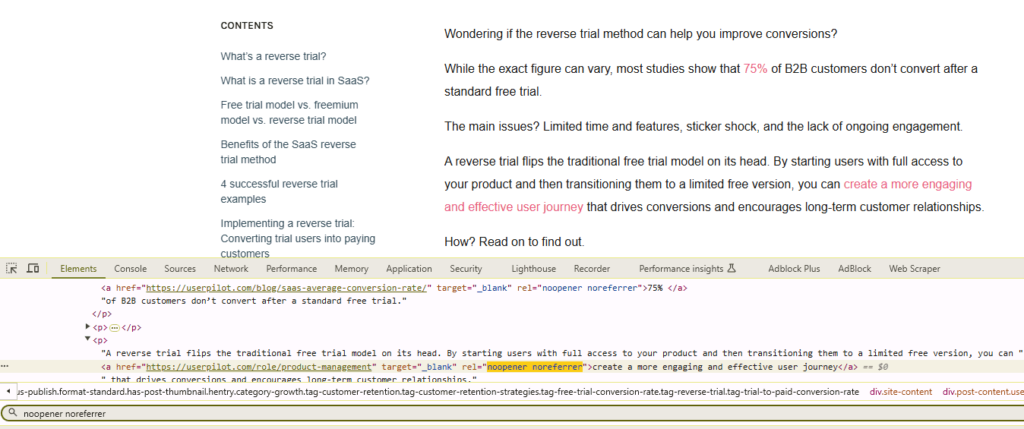
- Create a test page with an external link: <a href=”https://example.com” target=”_blank” rel=”noopener noreferrer”>Test Link</a>
- Open your test page in Chrome, Firefox, or Safari
- Click the link to open it in a new tab
- In the new tab, press F12 to open Developer Tools
- Go to the Console tab
- Type window.opener and press Enter
- Check that the result shows null (if you see an object, rel=”noopener” isn’t working)
🛠️ Automated testing tools:
- 🖥️ Browser DevTools: Use the Console to check window.opener directly
- 🚨 Lighthouse SEO audit: Flags security issues with target=”_blank” links missing rel attributes
- 🕷️ Screaming Frog SEO Spider: Crawls your site and reports all external links with target=”_blank”
Run these tests quarterly or after major site updates to catch any links that slipped through without proper security attributes.
If you manage a large site with hundreds of external links, Screaming Frog can audit your entire domain in minutes and export a list of every vulnerable link that needs fixing.
Beyond manual testing, link building software can automate link quality checks and monitor security attributes across your entire backlink profile, saving 15–20 hours per month on link audits.
Build Backlinks That Track Properly
When sites link to you with rel=”noreferrer” attributes, you lose valuable referral data in your analytics. The solution isn’t just fixing attributes, it’s earning backlinks from domains that send clear traffic signals.
Ready to build high-authority backlinks with transparent referral tracking?
If you need a professional link-building agency that understands how rel=”noopener” rel=”noreferrer” affects backlink discovery and campaign measurement, check out BuildingBacklinks.io.
Choose from niche edit packages, guest post packages, or custom campaigns that prioritize links from sites with proper analytics visibility for your niche and goals.
Frequently Asked Questions
1) Does Using rel=”noopener” rel=”noreferrer” Mess With my SEO?
Not at all. These attributes simply keep your site more secure. They don’t change your Google rankings or block link value. Search engines treat links with rel=”noopener” and rel=”noreferrer” exactly the same as links without them.
2) What Happens If I Forget to Add rel=”noopener” rel=”noreferrer” to My Links?
External sites can hijack your original tab and redirect users to phishing pages. They’ll enter passwords thinking they’re on your site. You’re also leaking referrer data to competitors. Modern browsers auto-add rel=”noopener” but not rel=”noreferrer”, so the privacy gap stays open.
3) Should I Use Only rel=”noopener” If I Want To Track Referral Traffic?
Yes. If you care about seeing where your visitors go (especially for affiliate links), add just rel=”noopener” and leave out rel=”noreferrer”. rel=”noreferrer” stops the other site from seeing your site as a referrer, which breaks affiliate tracking.
4) Is it Safe To Remove These Attributes From WordPress Links?
Technically yes, you can remove them, but you’d be losing an important security layer. rel=”noopener” and rel=”noreferrer” help protect people on your site from tabnapping exploits.